NetLimiter Pro v3.0.0.10-MPT | 4 Mb
NetLimiter Pro - a program that solves the problem of monitoring network traffic. NetLimiter monitors the activities of each application that uses the Internet access, and actively manage the traffic, controlling the flow rate data. You can set the speed to download and send information to each individual application or connection. Thus, if a program is in its work too actively consumes network resources, then you have a real chance to temper its appetite. NetLimiter also conducts detailed statistics on all compounds, displaying it in graphs or tables.
NetLimiter 3 feature list:
- Limits
You can use NetLimiter 3 to set download or upload transfer rate limits for applications, connectionsand filters. With limits you can easily manage your internet connection's bandwidth (bandwidth shaper) and share it among all applications running on your computer.
Search Sofware Or Ebook
Custom Search
Showing posts with label Free Sofware Computer and Internet. Show all posts
Sunday, March 6
Tuesday, March 1
ShadowNET DDoSER [Host Booter] Not a lame Web Shell Booter!
? ShadowNET v1 ?
Introduction
The name, 'ShadowNET' came from my mind, as the DDoSER is related to DDoSING and Bot keeping. I thought it would match the criteria. ShadowNET was beeing developed more than 3 months, and, finally today it came out. A new, powerful and stable DDoSER on the Market. With it's power, you can take down websites, boot on XBL and much more. There are almost no Limits! When having a lot of bots, you can easily make money. In the 1st Version, there might be some bugs. Please make sure you report them to us so we can fix them. The DDoSER was coded in Delphi 7, so there are no dependencies needed!
Features
Adobe Photoshop CS5 Keygen
First credits go to the.croosy
http://www.virustotal.com/file-scan/repo...1298637694
Virus Total
Virustotal is a service that analyzes suspicious files and URLs and facilitates the quick detection of viruses, worms, trojans, and all kinds of malware detected by antivirus engines. More information...
Monday, February 28
Unlocker 1.9.0
If you've ever been unable to delete a file in Windows, and can't figure out what program's using it, Unlocker is the solution. Have you ever seen these Windows error messages?
- Cannot delete folder: It is being used by another person or program
- Cannot delete file: Access is denied
- There has been a sharing violation.
- The source or destination file may be in use.
- The file is in use by another program or user.
- Make sure the disk is not full or write-protected and that the file is not currently in use.
Unlocker can help! Simply right-click the folder or file and select Unlocker. If the folder or file is locked, a window listing of lockers will appear. Simply click Unlock All and you are done!
Export Table to SQL for SQL server 1.06.42
Description :
Export Table to SQL for Microsoft SQL Server helps to save table's data as a set of INSERT SQL statements and optional CREATE TABLE statement. Predefined or cusrtom separators like 'go', two identity support modes and a few options make this tool flexible. The program has easy to learn and to use wizard interface. This handy utility helps database developers and database administrators to create table-based SQL script within seconds.
Saturday, February 26
CubeDesktop 2011
| Title: CubeDesktop | Version: 2011 | Producer: Tink In Bytes | Type: Customization | Size: 7.3 MB |
We know that you do a lot on your PC. Use CubeDesktop to group your icons and windows and banish clutter completly.
Now you can work with up to six virtual desktops and switch between them in less than a blink.
Download :
We know that you do a lot on your PC. Use CubeDesktop to group your icons and windows and banish clutter completly.
Now you can work with up to six virtual desktops and switch between them in less than a blink.
Download :
http://uploading.com/files/9798aede/CubeDesktop_SC.212.rar/
Netman 5.51
As a great assistant to office work, Netman can work without installation, so it is a user-friendly and absolutely safe remote control freeware. It is NAT accessible, which enables you to remotely control any PC anywhere on the Internet. By entering partner's IP and password that appear on the software, you can connect to partner's desktop instantly. It provides functions of having computers started and shuted down remotely,desktop sharing(with screen recording), mouse and keyboard remote controlling, instant text messaging & video chatting(you can also make a video record), files transferring/modifying, etc. Also, you can switch sides with partner and show your own desktop to him/her... Netman primary applies to remote working and monitoring. Whenever you need to get connect to your office computer, just remotely start it (achieve this with our hardware),and remotely upload/download/modify files as you operate your PC. When the session is over, shut it down remotely. Thus Netman is the safest remote control software in the world. With Netman, you won't need to rush back and forth for the files left behind, which will improve your work efficiency remarkably. This application also addresses the needs of people who travel frequently and want to use it from different, always changing computers. With Netman, you can also fulfill group presentation and demonstration at meeting over the Internet for free. Netman has personal version and enterprise version. Personal version is published on the Internet and for free, while enterprise version applies to business management and charges. Login with account number(without partner's IP) on the enterprise version, then you will get dozens of computers' screen displaying on your computer. In a company, administrators may watch staff's screens, message them and have conversations with them, conduct remote boot and shut down in batch,as well as send files in batch to them.
Netman 5.51 is a commendable tool that supports you in remotely controlling any PC without requiring you to go through any monotonous installation process. It is NAT accessible enabling you to instantly access PCs remotely on the Internet, by entering the relevant IP and password. The program offers you control to perform different fucntions over remote PC such as start or shutdown computers remotely, share desktop through screen recording, remote control mouse and keyboard, send instant text message, video chat, transfer/modify files, and even more. However, you can also share your own desktop with teammates as remote PC user, while you’re working on a project. It basically functions for remote monitoring and working; so you can even access your office computer remotely for uploading/downloading/modifying files, and later shutdown the PC remotely.
Using Netman software you wouldn’t require rushing for the required files, thus can save loads of time and improve work efficiency. The program allows you to give away group demonstration and presentation over online meetings. As you login with account number, you’d get the list of entire PCs in your organization for remotely controlling them. It enables administrators to keep a vigil eye over staff`s screens, have conversations, message them, conduct remote batch shutdown and boot, and even send required files in batch mode. The main screen presents segment showing fields for Local IP and password and RemoteIP and Password, along with options form selecting to remote control, file management, or video control. Entering the RemoteIP and Password you can press Connect PC for controlling the PC. You can easily perform the specified tasks, and further can alter Settings to control program’s functioning. Moreover, the program associates Help option to give you easy access to guidance for using it.
Netman 5.51 application allows remote controlling different PCs connected through the internet by specifying the IP and password. The utility features impressive set of functions and their supporting options to deliver excellent performance, which makes it worthy of 4.5 rating points.
Netman 5.51 is a commendable tool that supports you in remotely controlling any PC without requiring you to go through any monotonous installation process. It is NAT accessible enabling you to instantly access PCs remotely on the Internet, by entering the relevant IP and password. The program offers you control to perform different fucntions over remote PC such as start or shutdown computers remotely, share desktop through screen recording, remote control mouse and keyboard, send instant text message, video chat, transfer/modify files, and even more. However, you can also share your own desktop with teammates as remote PC user, while you’re working on a project. It basically functions for remote monitoring and working; so you can even access your office computer remotely for uploading/downloading/modifying files, and later shutdown the PC remotely.
Using Netman software you wouldn’t require rushing for the required files, thus can save loads of time and improve work efficiency. The program allows you to give away group demonstration and presentation over online meetings. As you login with account number, you’d get the list of entire PCs in your organization for remotely controlling them. It enables administrators to keep a vigil eye over staff`s screens, have conversations, message them, conduct remote batch shutdown and boot, and even send required files in batch mode. The main screen presents segment showing fields for Local IP and password and RemoteIP and Password, along with options form selecting to remote control, file management, or video control. Entering the RemoteIP and Password you can press Connect PC for controlling the PC. You can easily perform the specified tasks, and further can alter Settings to control program’s functioning. Moreover, the program associates Help option to give you easy access to guidance for using it.
Netman 5.51 application allows remote controlling different PCs connected through the internet by specifying the IP and password. The utility features impressive set of functions and their supporting options to deliver excellent performance, which makes it worthy of 4.5 rating points.
Nsauditor Network Security Auditor 2.1.6
Nsauditor Network Security Auditor is a network security scanner that allows to audit and monitor remote network computers for possible vulnerabilities, checks your network for all potential methods that a hacker might use to attack it. Nsauditor is a complete networking utilities package that includes a wide range of tools for network auditing, scanning, monitoring and more. You can discover network services and check them for vulnerabilities, list all TCP and UDP endpoints with their associated process, discover NetBios names, audit MS SQL servers, scan for common Adware traces and more. The program also includes real-time network packet filtering and analyzing, remote network performance monitoring, network status monitoring, web proxy scanning, password auditing, intrusion detection system based on security events log analyzer and firewall system that allows to stop internet threats and block unwanted network connections, IP address lookup and more than 45 network tools for scanning, sniffing, enumerating and gaining access to machines, DNS and WHOIS lookups, e-mail validation and HTTP traffic generator. Overall, this is a very complete package for a surprisingly low price. The product contains a built-in database of known network security vulnerabilities, which allows you to select the items for scanning and add custom entries. Nsauditor can reveal and catalog a variety of information, including installed software, shares, users, drives, hotfixes, NetBios, RPC, SQL and SNMP information, open ports. It can also audit password and security policies as well as make a variety of network attack probes, such as stealth port scans, HTTP / CGI server auditing, registry auditing. The program can sniff and use brute-force and dictionary attacks on LM and NTLM password hashes and expose the insecure ones. Nsauditor does OS detection and automatically creates OS fingerprints which are not included in database. Reports can be generated in HTML and XML format.
A tool that helps administrators monitor the security of terminals on a network remotely.
Pros: Nsauditor Network Security Auditor is a tool that allows a user to monitor the security of a number of terminals on a network. It checks for all potential security holes in the local network and informs the user of these potential problems. It not only has network auditing functions but augments these with scanning and monitoring functions as well. TCP, UDP endpoints can be identified by processes (and port numbers) using them. Unwanted connections can be identified and closed remotely right from the Nsauditor window. All in all it is a one stop shop for all things that are required by network administrators.
The main features include an HTTP Traffic generator, DNS / WHOIS lookup capabilities, Sniffing, Network Scanning, Packet filtering and analysis, Web Proxy scanning, a tough firewall, and more. A number of auditing functions help to monitor the health of the network and its security: Password auditing, Registry auditing, Log analyzer, Network attack probes, HTTP & CGI server auditing, OS detection and finger-printing, and a robust intrusion detection system. It also allows in addition to the DNS / WHOIS lookups, LM / NTLM lookups, cataloging of RPC, SQL, SNMP information after their discovery and much more. All in all, a very powerful tool for administrators to monitor network security.
Cons: The interface is really hard to get around and is definitely intended only for administrators. That may not be a bad thing seeing as this ought not to fall into the hands of anyone but an administrator, because they could wreak havoc. In fact, that is also the single biggest concern about this tool that it has too much information at one location which can pose a significant security threat.
Overall: 4 stars. Works well as it is intended to do. Difficult interface and it may pose a security threat if it falls into the wrong hands.
A tool that helps administrators monitor the security of terminals on a network remotely.
Pros: Nsauditor Network Security Auditor is a tool that allows a user to monitor the security of a number of terminals on a network. It checks for all potential security holes in the local network and informs the user of these potential problems. It not only has network auditing functions but augments these with scanning and monitoring functions as well. TCP, UDP endpoints can be identified by processes (and port numbers) using them. Unwanted connections can be identified and closed remotely right from the Nsauditor window. All in all it is a one stop shop for all things that are required by network administrators.
The main features include an HTTP Traffic generator, DNS / WHOIS lookup capabilities, Sniffing, Network Scanning, Packet filtering and analysis, Web Proxy scanning, a tough firewall, and more. A number of auditing functions help to monitor the health of the network and its security: Password auditing, Registry auditing, Log analyzer, Network attack probes, HTTP & CGI server auditing, OS detection and finger-printing, and a robust intrusion detection system. It also allows in addition to the DNS / WHOIS lookups, LM / NTLM lookups, cataloging of RPC, SQL, SNMP information after their discovery and much more. All in all, a very powerful tool for administrators to monitor network security.
Cons: The interface is really hard to get around and is definitely intended only for administrators. That may not be a bad thing seeing as this ought not to fall into the hands of anyone but an administrator, because they could wreak havoc. In fact, that is also the single biggest concern about this tool that it has too much information at one location which can pose a significant security threat.
Overall: 4 stars. Works well as it is intended to do. Difficult interface and it may pose a security threat if it falls into the wrong hands.
Softros LAN Messenger 4.5.2 Download
Is your company starting to experience communication problems? Does it take too much time to call your co-workers to invite them to a group meeting? Hate walking all over the building to solve some trivial issue? Then its time for your company to consider implementing network messaging solution. Softros LAN Messenger is a instant LAN messaging software application for an effective office communication. It does not require a server and is very easy to install and use. The program correctly identifies all Windows NT/2000/XP user accounts and works in any TCP/IP network. Softros LAN Messenger comes with a variety of handy features, like message notification alarms, private, group or offline messages, files transfer, WinXP/Vista theme support, and intuitive interface. Softros LAN Messenger offers strong encryption options for all incoming and outgoing messages, guaranteeing no unauthorized person ever reads personal correspondence. The program is very stable when running under any Windows operating system and in any network, regardless of its size. This application can be used for contacting individual users or for group notifications. All messages are logged, so there is no risk of losing a message. All correspondence can be looked up at any time. Conveniently, there are sound alarms for incoming messages. The program is very straightforward and requires no special training. It is ready to be used right after installation is completed. Configuring the program can be done by individual users without requesting any assistance from the IT staff or system administrators. All settings can be saved and easily transferred to another computer, if necessary. Another advantage of the program is its low cost and flexible licensing options with generous volume discounts. Supports Windows/Citrix terminal services.
With Softros LAN Messenger set up your small instant messaging network within your home or office.
No need to run about your office to circulate messages, with this tool one can easily set up a small network of instant communicating services. Message notification alarms, private and group messages, files transfer, WinXP theme support, and intuitive interface are the general features of this software. In-built strong encryption attains the optimum privacy of incoming and outgoing messages. You do not need any internet connection to access neither do you need any advanced skills to set up this software. This software allows to set up user restrictions, all the messages are logged hence you will not lose any message, sounds and alarms settings for all incoming messages and all saved settings can be transferred to another computer.
Apart from the above summarized features this must have tool is supported with a multilingual interface and full Windows XP themes support.
With Softros LAN Messenger set up your small instant messaging network within your home or office.
No need to run about your office to circulate messages, with this tool one can easily set up a small network of instant communicating services. Message notification alarms, private and group messages, files transfer, WinXP theme support, and intuitive interface are the general features of this software. In-built strong encryption attains the optimum privacy of incoming and outgoing messages. You do not need any internet connection to access neither do you need any advanced skills to set up this software. This software allows to set up user restrictions, all the messages are logged hence you will not lose any message, sounds and alarms settings for all incoming messages and all saved settings can be transferred to another computer.
Apart from the above summarized features this must have tool is supported with a multilingual interface and full Windows XP themes support.
Flash HTML5 Web Video Player 1.2
MagicHTML Web Video Player is a fast and easy way to add video player to your website. The Video Player works as Flash player on Windows, Linux and Mac, and automatically turns into HTML5 video player on iPhone and iPad, thus provides a seamlessly support to all modern devices and web browsers.
The software features a clean and easy to use interface. You can choose a player skin and customize its size to match your website. The video player also supports playlist, full screen mode, progress bar, optional text information and poster images.
You can set up the video player automatically playing or manually playing on startup. You can also set up the autoplay mode when switching between videos.
The software creates the complete HTML code and all required files to insert the video player into your web page.
The software features a clean and easy to use interface. You can choose a player skin and customize its size to match your website. The video player also supports playlist, full screen mode, progress bar, optional text information and poster images.
You can set up the video player automatically playing or manually playing on startup. You can also set up the autoplay mode when switching between videos.
The software creates the complete HTML code and all required files to insert the video player into your web page.
PowerTerm InterConnect 9.2
PowerTerm InterConnect for Windows provides secure, seamless access to accounting, inventory management & other applications running on multiple hosts, e.g., IBM, Digital, UNIX and SCO. With extensive host system support it enables organizations to standardize on a single host access solution, including support for over 35 terminal emulators.
Platforms Supported: Win XP,2003,Vista,2008,7,2008 R2
Hosts Supported: IBM Mainframe & AS/400 (iSeries),Unix,Linux,OpenVMS,Data General,SCO,Tandem (NSK),HP-3000
Supports over 35 Terminal Emulation Types
IBM: 3270 (TN3270E),5250 (TN5250),3151
Digital: VT52,VT100,VT220,VT320,VT420,VT510,VT520,VT525
ANSI: BBS-ANSI,SCO-ANSI,AT386,AIX Term,Linux,XTERM,WY370
Wyse/TVI: Wyse (50/50+/60), Televideo TVI 910+/920/925/950/955, ADDS VP A2, HZ1500
Others: Data General D-412, Siemens 97801, HP 700, Tandem 6530
Key Benefits
* Quick & simple to install. Small footprint and easy installation on any PC, PowerTerm InterConnect saves valuable time and space
* Enables reliable access to accounting, inventory management, transaction processing and other business-critical legacy apps
* For secure connectivity, PowerTerm InterConnect supports SSH, SSL and SFTP for secure file transfer. Also supports SSH keys for extended security, Kerberos for encryption and Single Sign On
* FIPS-Compliant add-on is available
* Intuitive and easy-to-use, PowerTerm InterConnect's GUI enables users to do their work quickly and efficiently
Features
* Customizable function keys
* Supports multiple current sessions
* LK450 keyboard support
* Graphical drag & drop keyboard mapping
* Session manager for pre-configuring sessions
* Power Script Language for recording tasks
* Drag-and-drop tools for quick data accessibility
* AS/400 DFT for easy file transfer between PC and AS/400 host
* Terminal Server Edition for multiple simultaneous users
* Multiple language support: the GUI is available in English, German, French, Spanish and Italian, & more
Platforms Supported: Win XP,2003,Vista,2008,7,2008 R2
Hosts Supported: IBM Mainframe & AS/400 (iSeries),Unix,Linux,OpenVMS,Data General,SCO,Tandem (NSK),HP-3000
Supports over 35 Terminal Emulation Types
IBM: 3270 (TN3270E),5250 (TN5250),3151
Digital: VT52,VT100,VT220,VT320,VT420,VT510,VT520,VT525
ANSI: BBS-ANSI,SCO-ANSI,AT386,AIX Term,Linux,XTERM,WY370
Wyse/TVI: Wyse (50/50+/60), Televideo TVI 910+/920/925/950/955, ADDS VP A2, HZ1500
Others: Data General D-412, Siemens 97801, HP 700, Tandem 6530
Key Benefits
* Quick & simple to install. Small footprint and easy installation on any PC, PowerTerm InterConnect saves valuable time and space
* Enables reliable access to accounting, inventory management, transaction processing and other business-critical legacy apps
* For secure connectivity, PowerTerm InterConnect supports SSH, SSL and SFTP for secure file transfer. Also supports SSH keys for extended security, Kerberos for encryption and Single Sign On
* FIPS-Compliant add-on is available
* Intuitive and easy-to-use, PowerTerm InterConnect's GUI enables users to do their work quickly and efficiently
Features
* Customizable function keys
* Supports multiple current sessions
* LK450 keyboard support
* Graphical drag & drop keyboard mapping
* Session manager for pre-configuring sessions
* Power Script Language for recording tasks
* Drag-and-drop tools for quick data accessibility
* AS/400 DFT for easy file transfer between PC and AS/400 host
* Terminal Server Edition for multiple simultaneous users
* Multiple language support: the GUI is available in English, German, French, Spanish and Italian, & more
Thursday, February 24
Sofware Melihat Video Streaming tanpa Buffering
kalo mau liat video secara online (video streaming) suka susah karena disana ada proses buffering. apalagi kalo kita pake speed internet yang pas - pas an bahkan lambat. disini saya share biar pas nonton streaming, bisa lebih cepat.
Toolsnya bernama Bywifi Video Accelerator. cara kerjanya yaitu bisa mempercepat bit-rate video streaming hingga 3-5 kali lebih cepat. Selain itu ada beberapa fungsi lain yang sangat membantu seperti "download" yang bisa digunakan untuk mendownload video dari beberapa situs video streaming yang didukung oleh Bywifi Video Accelerator.
Situs yang didikung oleh Bywifi Video Accelerator adalah:
YouTube, Facebook, Dailymotion, Veoh, Metacafe, 56.com, Youku, Tudou, CrunchyRoll, MegaVideo, 5min, 6.cn, 9you, Angry Alien, AnimeEpisodes.Net, Badjojo, Bebo, Blastro, Blennus, Blip.tv, Bofunk, BollywoodHungama, Break, Broadcaster, Buzznet, Chilevision.cl, ClipFish.de, ClipLife.jp, ClipJunkie, ClipShack, CollegeHumor, Current, Current TV, Dachix, Danerd, DailySixer.com, dalealplay, DevilDucky, Disclose.tv, DoubleAgent, eBaumsWorld, elpolvorin, eSnips, ExpertVillage, EVTV1, FindVideos, Flurl, FunnyJunk, FunnyorDie, Glumbert, GodTube, GoFish, Google Video, Graspr, iFilm, Hallpass, HowCast, HowStuffWorks, iShare.Rediff, Jokeroo, Jumpcut, Justin.tv, Kewego, Kontraband, ku6, Izlesene, LiveVideo, LiveLeak, lulu.tv, Mediabum, Midis.biz, MilkandCookies, Mojoflix, MonkeySee, Music.com, MusicMaza, MusicVideoCodes.info, Myspace, MyVideo.de, Newgrounds, NothingToxic, Pikniktube, Pixparty, Photobucket, PlsThx, PokerTube, Putfile, PWNorDIE, RetroJunk, Revver, RuTube.ru, SantaBanta, Sevenload, Sharkle, Shoutfile, Sina Videos, SmitHappens, Snotr, Spike, StreetFire.net, StupidVideos, SuperDeluxe, SuperNovaTube, TeacherTube, That Video Site, TheOnion, TinyPic, TotallyCrap, tu.tv, vbox7, Viddyou, Videa.hu, VideoWebTown, VideoCodesWorld, VideoCodeZone, videolectures, Vidiac, Vidivodo, vidiLife, VidPK, Vimeo, VReel.net, vSocial, Yahoo Videos, WeGame, Wuapi, Yikers, Yobler, YourFileHost, YouSportz, YummyBun, ZippyVideos, Zoopy, zShare.net,
silahkan download langsung. cuma sekitar 7mb an size na
Sumber:esc-creation.org
Notice : "Leave your comments here because the author took your advice and criticism for the better future of this Blog"
Toolsnya bernama Bywifi Video Accelerator. cara kerjanya yaitu bisa mempercepat bit-rate video streaming hingga 3-5 kali lebih cepat. Selain itu ada beberapa fungsi lain yang sangat membantu seperti "download" yang bisa digunakan untuk mendownload video dari beberapa situs video streaming yang didukung oleh Bywifi Video Accelerator.
Situs yang didikung oleh Bywifi Video Accelerator adalah:
YouTube, Facebook, Dailymotion, Veoh, Metacafe, 56.com, Youku, Tudou, CrunchyRoll, MegaVideo, 5min, 6.cn, 9you, Angry Alien, AnimeEpisodes.Net, Badjojo, Bebo, Blastro, Blennus, Blip.tv, Bofunk, BollywoodHungama, Break, Broadcaster, Buzznet, Chilevision.cl, ClipFish.de, ClipLife.jp, ClipJunkie, ClipShack, CollegeHumor, Current, Current TV, Dachix, Danerd, DailySixer.com, dalealplay, DevilDucky, Disclose.tv, DoubleAgent, eBaumsWorld, elpolvorin, eSnips, ExpertVillage, EVTV1, FindVideos, Flurl, FunnyJunk, FunnyorDie, Glumbert, GodTube, GoFish, Google Video, Graspr, iFilm, Hallpass, HowCast, HowStuffWorks, iShare.Rediff, Jokeroo, Jumpcut, Justin.tv, Kewego, Kontraband, ku6, Izlesene, LiveVideo, LiveLeak, lulu.tv, Mediabum, Midis.biz, MilkandCookies, Mojoflix, MonkeySee, Music.com, MusicMaza, MusicVideoCodes.info, Myspace, MyVideo.de, Newgrounds, NothingToxic, Pikniktube, Pixparty, Photobucket, PlsThx, PokerTube, Putfile, PWNorDIE, RetroJunk, Revver, RuTube.ru, SantaBanta, Sevenload, Sharkle, Shoutfile, Sina Videos, SmitHappens, Snotr, Spike, StreetFire.net, StupidVideos, SuperDeluxe, SuperNovaTube, TeacherTube, That Video Site, TheOnion, TinyPic, TotallyCrap, tu.tv, vbox7, Viddyou, Videa.hu, VideoWebTown, VideoCodesWorld, VideoCodeZone, videolectures, Vidiac, Vidivodo, vidiLife, VidPK, Vimeo, VReel.net, vSocial, Yahoo Videos, WeGame, Wuapi, Yikers, Yobler, YourFileHost, YouSportz, YummyBun, ZippyVideos, Zoopy, zShare.net,
silahkan download langsung. cuma sekitar 7mb an size na
Sumber:esc-creation.org
Notice : "Leave your comments here because the author took your advice and criticism for the better future of this Blog"
Faronics DeepFreeze Server Enterprise 7.10.270.3176 Multilingual | 197.66 MB
Deep Freeze instantly protects and preserves baseline computer configurations. No matter what changes a user makes to a workstation, simply restart to eradicate all changes and reset the computer to its original state – right down to the last byte. Expensive computer assets are kept running at 100% capacity and technical support time is reduced or eliminated completely. The result is consistent trouble-free computing on a truly protected and parallel network, completely free of harmful viruses and unwanted programs. While Deep Freeze provides bulletproof protection, its non-restrictive approach also improves user productivity and satisfaction. Placing no restrictions on a user’s ability to access all system resources, users avoid the frustration of downtime due to software conflicts, operating system corruption, virus attacks, and many other problems. Users are always assured of computers that are consistently operable and available.
Deep Freeze Standard is changing the way IT Professionals protect small multi-user environments. Simple, robust, and cost effective, Deep Freeze Standard is ideal for computing environments with 10 or less workstations or for environments that don’t require central management or control.
Absolute Protection
• Guarantees 100% workstation recovery on restart
• Provides password protection and complete security
• Protects multiple hard drives and partitions
Integration and Compatibility
• Supports multiple hard drives and partitions
• Supports multi-boot environments
• Compatible with Fast User Switching
• Supports SCSI, ATA, SATA, and IDE hard drives
• Single install for Windows 95, 98, ME, 2000, XP and Vista
• Supports FAT, FAT32, NTFS, basic and dynamic disks
• Localized in five languages: English, French, German, Spanish and Japanese
Deployment Options
• Offers silent install option for rapid network deployment
• Provides option to deploy on multiple workstations as part of a master image
• DFC included in Workstation/Seed installations
Notice : "Leave your comments here because the author took your advice and criticism for the better future of this Blog"
Deep Freeze Standard is changing the way IT Professionals protect small multi-user environments. Simple, robust, and cost effective, Deep Freeze Standard is ideal for computing environments with 10 or less workstations or for environments that don’t require central management or control.
Absolute Protection
• Guarantees 100% workstation recovery on restart
• Provides password protection and complete security
• Protects multiple hard drives and partitions
Integration and Compatibility
• Supports multiple hard drives and partitions
• Supports multi-boot environments
• Compatible with Fast User Switching
• Supports SCSI, ATA, SATA, and IDE hard drives
• Single install for Windows 95, 98, ME, 2000, XP and Vista
• Supports FAT, FAT32, NTFS, basic and dynamic disks
• Localized in five languages: English, French, German, Spanish and Japanese
Deployment Options
• Offers silent install option for rapid network deployment
• Provides option to deploy on multiple workstations as part of a master image
• DFC included in Workstation/Seed installations
Notice : "Leave your comments here because the author took your advice and criticism for the better future of this Blog"
Kristanix Password Generator Professional 5.52 Enterprise Edition | 5.33 MB
Password Generator Professional can generate millions of unique passwords in a matter of seconds. It will ensure the passwords are completely random, and cannot be guessed by hackers. You will be able to customize the format of the passwords in virtually any way you want, and you have a wide range of export possibilities.
Features Highlight
Quickly Generate Secure Passwords
Set the length and number of passwords you need, and press “Generate” to get going.
Use Flexible Masking Patterns
Use masked mode to fine tune your results.
Enjoy Word List and Dictionary Support
Grab words from files, modify and use them as you please.
Make Easy To Remember Passwords
Make pronounceable passwords that are easy to remember.
Make Secure, Random Numbers
The generation algorithm creates high quality random numbers using a twisted generalized shift feedback register.
Make Command-line Calls to Password Generator
Commandline support allows integration with your own system.
Run user-created scripts
You can use VBScript scripts to modify the generated passwords as you like.
Multiple Output Options
Export to text, XML, HTML, CSV and Microsoft Excel, print to paper and copy to clipboard.
Create Complete Login Details
Create user names or grab them from files and assign passwords.
Save to Multiple Files
You can generate long password lists into separate files, making them easier to manage.
Additional Features
Lightning fast generation of up to 1 billion unique passwords
Generate with phonetic spelling
Generate the hexadecimal version of passwords
Store options and patterns in templates
Preview passwords before generating
Filter out weak passwords
Filter out specific characters
Customize character sets
Home Page -
http://kristanixsoftware.com/passwordgenerator/
Notice : "Leave your comments here because the author took your advice and criticism for the better future of this Blog"
Features Highlight
Quickly Generate Secure Passwords
Set the length and number of passwords you need, and press “Generate” to get going.
Use Flexible Masking Patterns
Use masked mode to fine tune your results.
Enjoy Word List and Dictionary Support
Grab words from files, modify and use them as you please.
Make Easy To Remember Passwords
Make pronounceable passwords that are easy to remember.
Make Secure, Random Numbers
The generation algorithm creates high quality random numbers using a twisted generalized shift feedback register.
Make Command-line Calls to Password Generator
Commandline support allows integration with your own system.
Run user-created scripts
You can use VBScript scripts to modify the generated passwords as you like.
Multiple Output Options
Export to text, XML, HTML, CSV and Microsoft Excel, print to paper and copy to clipboard.
Create Complete Login Details
Create user names or grab them from files and assign passwords.
Save to Multiple Files
You can generate long password lists into separate files, making them easier to manage.
Additional Features
Lightning fast generation of up to 1 billion unique passwords
Generate with phonetic spelling
Generate the hexadecimal version of passwords
Store options and patterns in templates
Preview passwords before generating
Filter out weak passwords
Filter out specific characters
Customize character sets
Home Page -
http://kristanixsoftware.com/passwordgenerator/
Download Links :
Notice : "Leave your comments here because the author took your advice and criticism for the better future of this Blog"
Wednesday, February 23
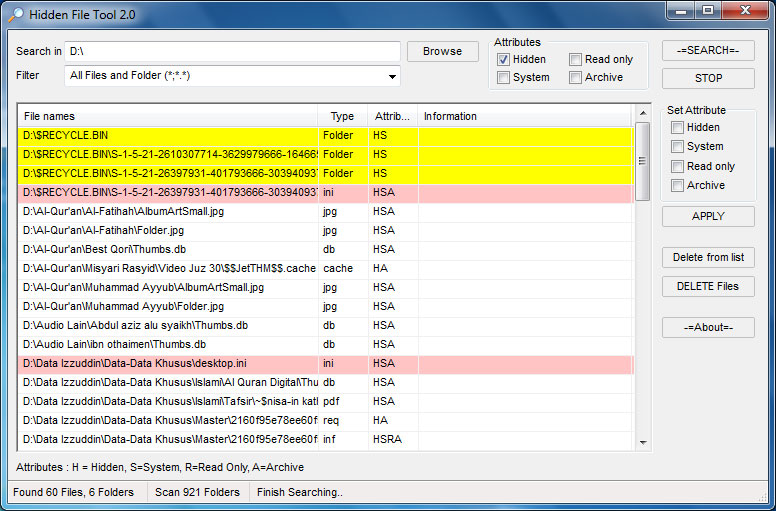
Hidden File Tool
This is my freeware that maybe useful for you. Small tool and portable to search (very fast) not only hidden files/folder, but also the other attribute, includes system-archive-read only. Plus easy change/set the file/folder attributes. Useful when your files/folders was hidden by virus (mallware), trojan etc.

Key Features :
Supported Operating System : Windows 9x,2000,XP,Vista and Windows 7
Download (size 36 KB): Hidden File Tool 2.0 ( via box.net) or HiddenFileTool in 4shared or just hidden_file_tool_2.0.zip ( ebsoft server)
Key Features :
- Small size (only about
27 KB36 KB ) and also portable - Search files/folder with Attributes hidden, system, read only or archive. You can use combination of them
- Custom filter. You can search all files ( default with *;*.* ) or specific file types, for example : *.exe;*.dll;*.pif
- Easily delete files from list
- Easily change the attributes of selected files/folder
- Custom directory search
- Highlight result for some file extensions
Supported Operating System : Windows 9x,2000,XP,Vista and Windows 7
Download (size 36 KB): Hidden File Tool 2.0 ( via box.net) or HiddenFileTool in 4shared or just hidden_file_tool_2.0.zip ( ebsoft server)
Notice : "Leave your comments here because the author took your advice and criticism for the better future of this Blog"
Sofware Kamus 2.04 New 2011
Kamus – an unique English – Indonesian Dictionary
Notice : "Leave your comments here because the author took your advice and criticism for the better future of this Blog"
Kamus is an English-Indonesian Dictionary and vice verse. This program is released as freeware for personal and non commercial use. For other uses just email me. Many software dictionaries are available, this one is different from the others, it tries to facilitate the translations and also helps in reading.
Key features of this software are:- Small size for easy distribution
- Simple and easy user interface
- Fast Search
- Automatic search between English and Indonesian languages. It will search English-Indonesian First, then if no word was found, it will try to find Indonesian – English. You can select individual languages.
- Clipboard monitoring. With this feature, the program will translate the text in the clipboard. So you just copy the text you want to translate and then kamus will find the translation in the program’s window. It will automatic remove the non alphabetic ( ‘a’ to ‘z’ ) character such as : !@#$%^&*():”?><,./'; etc
- Compact Mode, is an additional feature that may be very handy when you need to translate some text while you are reading. It was designed with a small form and only shows the text and the result.
- Smart Find
- Auto remove non-letters such as !’,:;.?”-)\(*/+, etc
- Highlighted result for Indonesian
- Find exact word, contained in text or Phrases.
- Adding new word and phrase
- More than 41.000 English-Indonesian words, 35.000 Indonesian-English words and more than 64.000 phrases.
- 20 nice skins with optimization
- Transparency Support ( Win 2k, XP and Up )
- History Window, since version 2.04 this feature was introduced. You can quickly select the history search
- Windows 9x/ME/NT/XP/2003/Vista/7
- Pentium II or above with 32 MB RAM.
Download Kamus
Download (select one) :- Kamus 2.04 (4Shared)
- Kamus 2.04, (DropBox)
- Kamus 2.04 (Microsoft SkyDrive)
- Kamus 2.04(download.com)
- Kamus 2.04 (softpedia.com)
- Kamus 2.04 (brothersoft.com)
Notice : "Leave your comments here because the author took your advice and criticism for the better future of this Blog"
Sunday, February 20
Internet Download Manager v6.05 + KeyGen & Patch 2011
Internet Download Manager (IDM) is a tool to increase download speeds by up to 5 times, resume and schedule downloads. Comprehensive error recovery and resume capability will restart broken or interrupted downloads due to lost connections, network problems, computer shutdowns, or unexpected power outages. Simple graphic user interface makes IDM user friendly and easy to use.Internet Download Manager has a smart download logic accelerator that features intelligent dynamic file segmentation and safe multipart downloading technology to accelerate your downloads. Unlike other download managers and accelerators Internet Download Manager segments downloaded files dynamically during download process and reuses available connections without additional connect and login stages to achieve best acceleration performance.
Download:
Part 1
Part 2
Notice : Thanks VladariesTeam.Blogspot.com been visiting her in the waiting comment
Saturday, February 19
jv16 PowerTools 2011 v2.0.0.1007 Free
jv16 PowerTools 2011 v2.0.0.1007 Final
Windows 2000/XP/Vista/Windows 7 (All 32/64 bit)
jv16 PowerTools is a Windows optimization, repair, and tuneup utility suite containing 27 different main tools, and dozens of smaller tools to keep your computer running smooth, fast, and greatly improve its overall stability.
This program allows users to remove hidden traces of previously uninstalled software, to clean the Windows registry for optimal performance and stability, and to fix many registry-based problems with a single mouse click.
Automatic backup creation makes it safe to use.
If you make a mistake, you can restore the backup created by the program and you're safe again.
The smallest details in the product have been designed with your ease of use in mind.
The user interface and the intuitive graphic tabs make the product easy to learn.
* Instantly make your Windows run faster and smoother, by disabling certain features which have no useful function and by modifying a few key aspects of the system's behavior.
* Automatically clean your Windows registry from obsolete and unneeded data.
* Automatically fix many kinds of registry errors, such as broken file references.
* Easily uninstall leftover traces of software you have thought you have already uninstalled ages ago.
* Detect and remove unneeded history data and MRU (most recently used) lists that can contain sensitive information about you.
* Locate and delete unneeded files, including temp files and duplicate files.
Features:
* One-click system Clean And Fix
* Clean Windows registry
* Uninstall software
* Optimize Windows
* Improve your privacy
* Recover deleted files
* Verify downloads are safe to run
* Safe to use - automatic backup feature
* Multilingual user interface
Main tools:
* Software Uninstaller
* Startup Manager
* Registry Manager
* Registry Cleaner
* Registry Finder
* Registry Find and Replace
* Registry Monitor
* Registry Compactor
* Registry Information
* File Finder
* File Cleaner
* File Organizer
* File Recovery
* Duplicate File Finder
* File Tool
* Directory Finder
* Directory Tool
* Disk Wiper
* Service Manager
* System Cleaner
* System Optimizer
* Start Menu Tool
* History Cleaner
* Automation Tool
New in jv16 PowerTools 2011:
* Easier and more fun to use
* Improved Registry Cleaner
* One-click system cleaning feature: Clean And Fix My Computer
* And much more
Notice : Thanks VladariesTeam.Blogspot.com been visiting her in the waiting comment
Sofware Underdepfreze 6
Buat yang lupa akan Pasword DepFreze nya mungkin bisa di coba sofware ini,,ini sofware bisa membobol deepfreze .gunakan dengan Bijak nya.Nich Link Download Nya Download Underdepfreze
Untuk sofware lain nya bisa kalin cari sendiri di Sini
Notice : Thanks VladariesTeam.Blogspot.com been visiting her in the waiting comment
Untuk sofware lain nya bisa kalin cari sendiri di Sini
Notice : Thanks VladariesTeam.Blogspot.com been visiting her in the waiting comment
Friday, February 18
Pointstone System Cleaner v5.9.2.332
Pointstone System Cleaner v5.9.2.332 | 4.13 MB
System Cleaner is a tool for restoring hard-drive space, cleaning up the history of your activities on your computer and keeping your system running like new. The program allows you to clean your drives from unnecessary and temporary files, including your browser cache, cookies, history, recent document list, temporary files, errant uninstall entries and more. It targets more than 100 file extensions, which enable it to scan and recognize most of the unnecessary files on your computer. You can choose to delete the files to the recycle bin or to a specified backup folder. In addition, System Cleaner includes a Windows Startup manager and also allows you to remove invalid uninstaller information from the registry as well as a restore wizard to undo the changes if needed. Key Features:
Restores your hard drive’s performance, hard-drive space and protect your privacy by cleaning Internet history, cache, temporary files, Windows temp files, recent document list, find history, run history, *.CHK files, the recycle bin, additional garbage and much, much more.
Scans dead shortcuts from your Start menu and Desktop. If it finds any shortcuts that point to files that do not exist, it will list them for you.
Lets you delete or disable entries that automatically start on Windows startup. This pulls all entries from your Start Menu-Programs-Startup folder as well as from the registry.
Define your own user defined items to remove (specified files or folders).
Backup files to a ZIP file or proprietary file format. You can later restore individual files using the “Restore Wizard”.
Clean Directories and Internet Cache Files. Allows you to clean directories that usually have Temporary Files or cache files (Windows Temp Directory, Documents Folder, MS Internet Explorer Cache Directory and Netscape Cache Directory).
Powerful file search. You can select to scan for files between a certain date, with some or all file attributes, with a certain size or with the contents of a file matching a user-defined text string.
Remove files to Recycle Bin, zip them, move them to a folder or completely delete them!
Scans multiple hard drives.
Fixes system errors that slow your PC down and cause it to crash
Speeds up your PC’s execution of software programs
Removes space-wasting temporary files and other unnecessary disk clutter
Tunes up and optimizes the Windows Registry
Erases all evidence of your computer and internet activity
Makes your PC boot faster
Makes your PC shutdown faster
Fine-tunes all important Windows settings
Download Links :
http://hotfile.com/dl/103184484/38cf516/psc.5.9.2.332.rar.html
or http://shareflare.net/download/71496.78d0ac8eff0c48d1a944d5b6d916/psc.5.9.2.332.rar.html
or
http://www.filesonic.com/file/77992271/psc.5.9.2.332.rar
or http://shareflare.net/download/71496.78d0ac8eff0c48d1a944d5b6d916/psc.5.9.2.332.rar.html
or
http://www.filesonic.com/file/77992271/psc.5.9.2.332.rar
Notice : Thanks VladariesTeam.Blogspot.com been visiting her in the waiting comment
Subscribe to:
Posts (Atom)